
How to Communicate in Russia Without Speaking Russian: Apps, Cyrillic & Key Phrases
 By Irena Domingo
Updated on
In This Article
Traveling to Russia and worried you don’t speak Russian? Relax: getting by there is easier than ever. With a good translation app (Yandex Translate is the queen), a few basics of the Cyrillic alphabet and a handful of key phrases, you’ll make yourself understood without trouble, even with people who don’t know a single word of English.
The trick is to arrive prepared. Inside Russia, several tools you take for granted (smooth Google Maps, WhatsApp, certain online translators) fail or simply don’t work. The best strategy combines three things: a translation app downloaded for offline use, being able to read Cyrillic and making sure you have internet. Let’s go step by step.
This is step 8 of my guide to planning a trip to Russia in 10 steps, where you’ll find everything else in order.
Do people speak English in Russia?
The short answer: not much, and very unevenly. In the latest EF English Proficiency Index (EF EPI), Russia sits at number 49 out of 123 countries, in the “moderate” band, with a score similar to (or even slightly below) Spain, France or Italy. It’s not the linguistic desert you might imagine, but don’t expect to get by on English alone either.
What really matters is where and with whom. In Moscow and Saint Petersburg, in hotels, city-center restaurants, major attractions and among younger people, you’ll find English without too much hassle. In outlying neighborhoods, small towns, markets, street-hailed taxis or with older people, the norm is that they won’t understand a thing. You don’t need perfect English, but knowing a little always helps.
Translation apps: your best ally
This is what has truly changed the game: with your phone in hand, language stops being a wall. My number-one tip: download the offline language pack BEFORE you travel (on your home Wi-Fi), because once you land in Russia it may take a while before you have data (I’ll explain why in a moment).
Yandex Translate (Яндекс Переводчик): the best one for Russian
This is the one I recommend first. Yandex is the “Russian Google”, and its translator nails Russian better than any other. It’s free and comes with everything you need:
- Camera translation: point your phone at a sign, a menu or a label and see the translation overlaid right on top. A lifesaver for Cyrillic.
- Voice and dialogue mode: you talk, the other person talks, and the app translates both ways. Ideal for taxi drivers, reception desks or shops.
- Offline mode: download the English–Russian pair and it works with no data.
- Dictionary with examples and pronunciation in Latin characters.
And it works perfectly inside Russia and without a VPN, something you can’t always take for granted with Western apps.

Google Translate: the wildcard
It’s still huge and free: 130+ languages, camera, conversation mode and offline packs. For odd phrases and quick lookups it works a treat. Its weak spot is long or idiomatic Russian, where it sounds more wooden than Yandex. Tip: download Russian for offline use at home, because inside Russia the connection to Google’s servers can fail.
DeepL: for more serious texts
If you need to translate a formal text or an email (writing to a hotel or a guide), DeepL usually gives the most natural result. My combo: Yandex for the street, Google as backup and DeepL for writing. With that, you’re more than covered.
Learn the Cyrillic alphabet (you can do it in an afternoon)
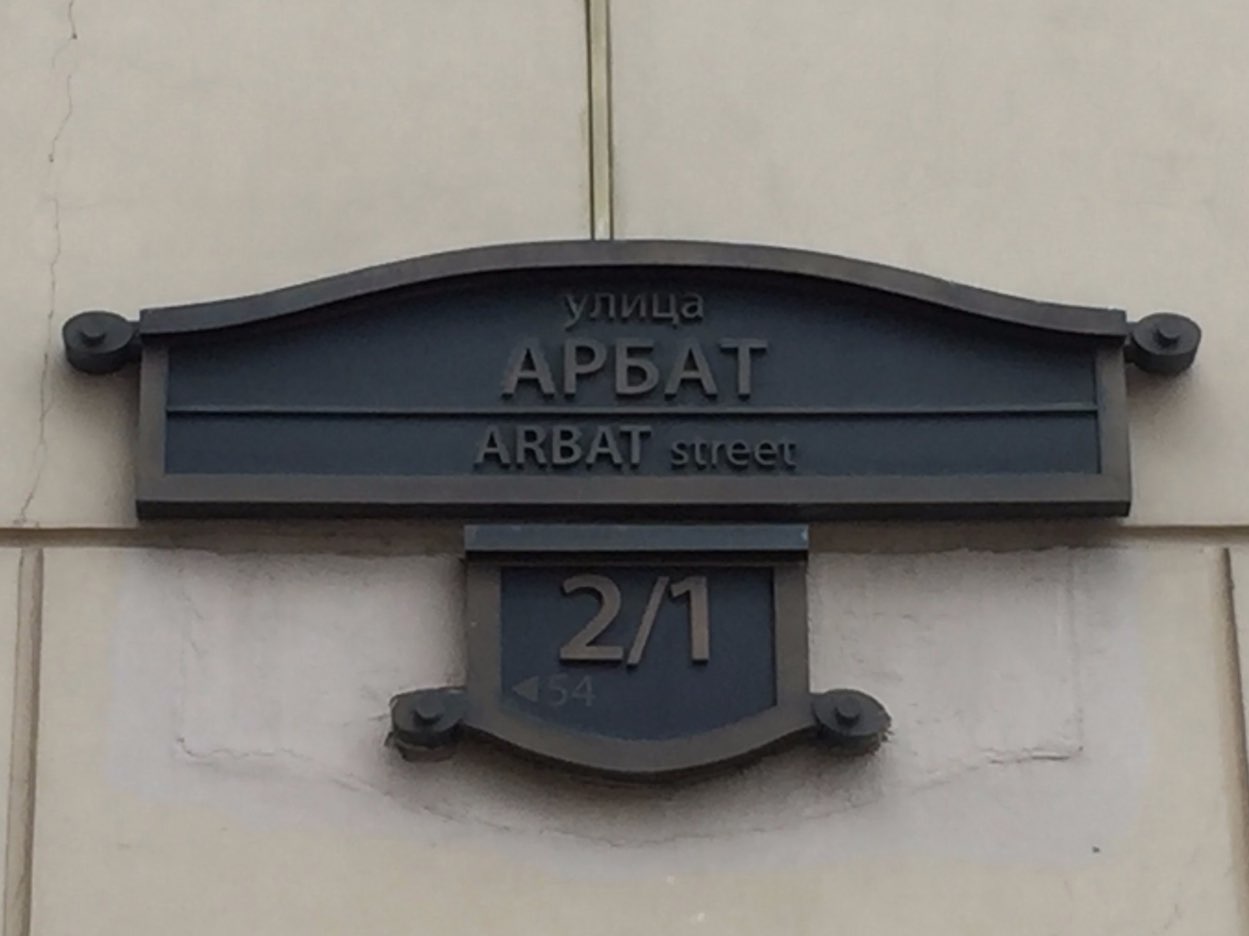
Even with a translator in your pocket, being able to read Cyrillic changes your trip: you read metro stations, street signs and the menu without pulling out your phone every two seconds. And it’s not that hard: many letters look like ours.
The secret lies in the “false friends“: letters that look Latin but sound different. These are the ones that really trip you up:
| В | sounds like V (not “B”) | Р | sounds like R (looks like a P) |
| Н | sounds like N | С | sounds like S (looks like a C) |
| У | sounds like OO (looks like a Y) | Х | sounds like a throaty H (the “ch” in “loch”) |
| П | sounds like P | И | sounds like EE |
| Г | sounds like G | Я | sounds like YA |
The rest (Ж, З, Ц, Ч, Ш, Щ, Э, Ю…) have their own sound, but with that table you can already decode almost everything. Practice with real examples:
- РЕСТОРАН → “restoran” = restaurant
- АПТЕКА → “aptyeka” = pharmacy
- ВХОД / ВЫХОД → “vkhod / vykhod” = entrance / exit
- МОСКВА → “Moskva” = Moscow
Basic Russian phrases that open doors
You don’t need to speak Russian, but throwing out two or three words is a gesture Russians appreciate enormously, and one that often completely changes the face of the person in front of you. Learn these (rough pronunciation for English speakers):
| Hello | Здравствуйте / Привет | zdrast-vooy-tye / pri-vyet |
| Thank you | Спасибо | spa-see-ba |
| Please / You’re welcome | Пожалуйста | pa-zhal-sta |
| Yes / No | Да / Нет | da / nyet |
| Sorry / Excuse me | Извините | iz-vi-nee-tye |
| Do you speak English? | Вы говорите по-английски? | vy ga-va-ree-tye pa-an-glee-ski |
| How much is it? | Сколько стоит? | skol-ka sto-it |
| I don’t understand | Я не понимаю | ya nye pa-ni-ma-yu |
| Help | Помогите | pa-ma-gee-tye |
No internet, no translator: lock in your connection
Almost everything above works better (or only works) with data. And here’s the most important warning of 2026: since October 2025, when a foreign SIM or eSIM connects to a Russian network for the first time, Russia blocks mobile data and SMS for around 24 hours (calls do work). It affects all carriers and providers equally.
How do you avoid being stranded on day one?
- Get an eSIM before you travel. Russian SIMs are barely sold to tourists anymore (they require local registration), so a data eSIM is the most practical option. With some (like Yesim, on the Beeline network) you can lift the block in a few minutes by verifying your identity through a link that arrives by SMS. I explain it in the guide on how to remove the 24-hour block with an eSIM and in the comparison of the best eSIMs for Russia.
- Download EVERYTHING for offline use before you leave: translator packs (Yandex and Google), maps, and your hotel address and bookings saved in notes.
- Don’t count on public Wi-Fi: airports and the metro require a Russian phone number by SMS to activate it, so as a tourist you won’t be able to use it.
Talking to home (and to Russians): messaging in 2026
If you want to stay in touch with your family, heads up, because the messaging landscape in Russia has changed a lot:
- WhatsApp is blocked in Russia as of February 2026. To use it you need a VPN (or an eSIM that routes your data outside Russia).
- Telegram is still available, but with restrictions and slow at times. Even so, it’s the app most used by travelers and locals alike.
- MAX is the Russian state messenger (from VK) that the government is promoting as an alternative. As a tourist, you don’t need to install it.
- Signal, Facebook, Instagram and YouTube are also blocked without a VPN.
For calls and video calls with home, the easiest thing is to bring a reliable VPN installed and tested before you leave. I cover it in the VPN guide for Russia, with specific articles on how to make video calls with Russia, on Telegram in Russia and on what the MAX app is.
The app kit for getting around without speaking
There are apps that practically eliminate the need to speak, because you communicate with maps and buttons instead of words:
- Yandex Go: the “Russian Uber”. You order a taxi by marking pickup and destination on the map, the price is fixed and the driver gets the address directly. You don’t have to say a word or haggle. A lifesaver.
- Yandex Maps / Yandex Metro: better than Google Maps inside Russia, with public transport and the metro covered in detail.
- 2GIS: a business directory and maps that work offline.

You’ll find the full rundown in the article on what apps to use in Russia. And if you’re getting around by taxi or metro, take a look at the guide to using taxis and at how to use the Moscow metro.
Tricks for specific situations
- At the restaurant: point the Yandex Translate camera at the menu. If that fails, point at the dish on the next table (works every time).
- In the taxi: use Yandex Go and forget about explaining anything. If you hail one on the street, have the address written in Cyrillic to show.
- On the metro: read the Cyrillic on the stations and lean on Yandex Metro; in the center, many signs are now also in the Latin alphabet.
- At the pharmacy (Аптека): translate the name of the medication or show a photo of the box.
- Emergencies: the single number is 112. Keep “Помогите” (pa-ma-gee-tye, help) handy, along with the address of your accommodation written down.
The good old analog backup
However digital everything gets, analog never fails and never runs out of battery: your hotel address written in Cyrillic to show people, photos on your phone of what you’re looking for, pen and paper to draw or write numbers, and an offline map (or a paper one from the tourist office).
As you can see, today you have a thousand resources to make yourself understood in Russia even if you don’t speak Russian. Sort it all out calmly before you leave and language will be the last thing you worry about.
Frequently asked questions
Can you travel to Russia without knowing any Russian?
Yes, no problem. With a translation app like Yandex Translate (with camera and voice mode), being able to read a bit of Cyrillic and a handful of basic phrases, you’ll make yourself understood just fine. In tourist areas and among younger people you’ll also find some English.
What’s the best translation app for Russia?
Yandex Translate is the best for Russian: it translates by camera and by voice, and works offline and without a VPN inside Russia. Google Translate is a good free backup and DeepL works very well for formal texts. Always download the offline pack before you travel.
Does Google Translate work in Russia?
It works, but the connection to its servers can fail inside the country. That’s why it’s worth downloading the Russian language for offline use before you leave. For Russian, Yandex Translate is usually more accurate.
Do people speak English in Russia?
Unevenly. Russia has a moderate level according to the EF EPI index, concentrated among younger people and in big cities. In hotels, city-center restaurants and tourist attractions you’ll find English; in remote areas or with older people, almost none.
Do I need internet to use a translator in Russia?
For online translation, yes. And watch out: since October 2025 foreign SIMs and eSIMs have their data blocked for around 24 hours when they first connect. The solution is to get an eSIM in advance and download the translator packs and maps for offline use before you travel.
Does WhatsApp work in Russia?
No. WhatsApp has been blocked in Russia since February 2026 and only works with a VPN. Telegram is still available with restrictions. To talk to home, bring a reliable VPN installed and tested before the trip.
In This Article
Was this useful? I'll tell you when something changes in Russia
One short email a month with what has changed for travellers (visas, payments, border crossings, apps), based on what readers report to me from Russia. More than 4,000 of us already. No spam: if you ever lose interest, unsubscribing is one click.
Irena DomingoAbout Me
I was born in Russia. I grew up between two worlds: my father was Russian, my mother Spanish — a descendant of the "Children of Russia", the Basque children evacuated to the USSR during the Spanish Civil War. I've worked as a translator, interpreter and Russian teacher for over 30 years, and since 2013 I've been writing this blog to help travellers discover Russia with practical, always up-to-date information. Author of the Russiable Guide. If this blog has helped you plan your trip, you can buy me a coffee ❤️.
 Saily and Airalo in Russia: Do They Work in 2026? (and the alternative that does)
 How to Buy a Russian SIM Card as a Foreigner in 2026
 How to buy a Russian VPS hosting server despite sanctions