Last Updated on April 9, 2024 by Irena Domingo
In this article I tell you my personal experience sending money to Russia using some methods that are currently working such as Advcash, Profee, Koronapay, BestChange or Cryptocurrencies.
I'm going to talk about ...
Methods that work (and those that don’t)
With the economic sanctions imposed on Russia, it has become increasingly difficult for me to send money to my relatives in Russia. This has meant that I have had to look for alternatives.
If before the conflict with Ukraine I used money transfer services such as Wise, after the sanctions I started using services such as Profee, Advcash, KoronaPay or BestChange.
In this article I will explain the methods that I have tried and that currently work to send money to Russia. And I emphasize “currently” because what works now may not work tomorrow, so I will try to keep this article updated.
I will begin by summarizing the current situation. Methods that DO NOT WORK to send money to Russia:
- Traditional money transfer methods such as Western Union, MoneyGram, Ria Money, etc. do not work.
- Western online payment services such as PayPal, Google Pay, Apple Wallet, Skrill, PaySend, Revolut, Payoneer, etc. do not work.
- The YooMoney (formerly Yandex Money) payment system does not work, as a Russian (or some countries of the former USSR) bank account is required to top up the account.
- P2P financial services such as Wise, Azimo, WorldRemit, Xe Money Transfer, SendNomad, etc. do not work.
Currently WORKING methods to send money to Russia:
- Sending money by bank transfer. Despite the fact that most Russian banks have been banned from the SWIFT system, there are still some Russian banks to which it is possible to make transfers, such as Raiffeisenbank, UniCredit, Citibank, OTP Bank, Renaissance Bank, Asia-Pacific Bank, Credit Europe Bank, BBR Bank or BKS Bank. In many cases, these are credit institutions that are subsidiaries of foreign banks, so no sanctions have been imposed on them. The problem is that they apply abusive commissions that can be up to 50%. It is best to check the current rates beforehand. For example, rates of Raiffesienbank and Unicredit. There is also the risk of the transfer being blocked.
- Send money using Volet electronic payment system. One of the best options for sending money but as of the end of February 2024 it does not work for sending money directly to bank cards or bank accounts in Russia. However, it is possible to send money in rubles if the recipient in Russia opens an account with Volet in rubles and then withdraws the money to their bank account or card.
- Send money with Profee. I have used it and it works in some Russian banks.
- Koronopay also works for sending money to Russia.
- Electronic money exchange services such as Bestchange also work.
- Sending money through cryptocurrencies.
I will explain each of the methods that I have tried and that have worked for me, as well as those where I know people who have used them successfully.
Option 1: Volet (formerly Advcash)
(UPDATE: From the end of February 2024 it is not possible to send money directly from Volet to bank accounts or bank cards in Russia. I will update this article when it will be possible again. However, it is possible to send money if the recipient in Russia also opens an account with Volet in rubles and then withdraws the money to their bank account or card -similar to sending money between PayPal accounts and then withdrawing the money-. It also allows sending cryptocurrencies). Note that Volet works in most countries around the world, except the USA and UK.
The most complete method for sending money to Russia is Volet, which allows you to send and receive electronic payments. The company, created by Russians, is licensed by the Belize Financial Services Commission, I assume than for tax reasons and because of laxer regulation to cope with sanctions.
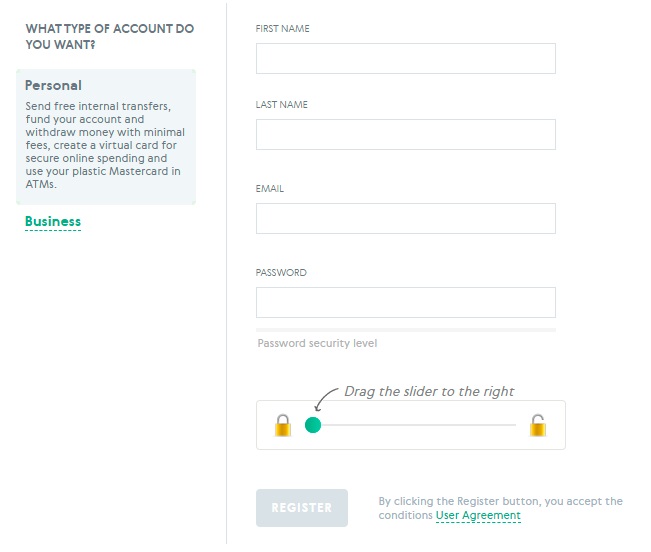
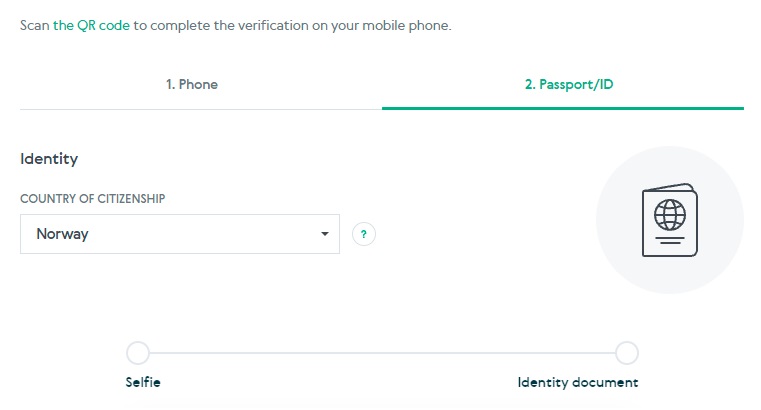
You must register by choosing a personal account. The account verification process is quick and consists of sending a copy of your ID or passport and taking a selfie. To extend the money limits of the account you are also required to send proof of your address by sending a utility bill.
When I signed up with Advcash the verification process took about 15 minutes.
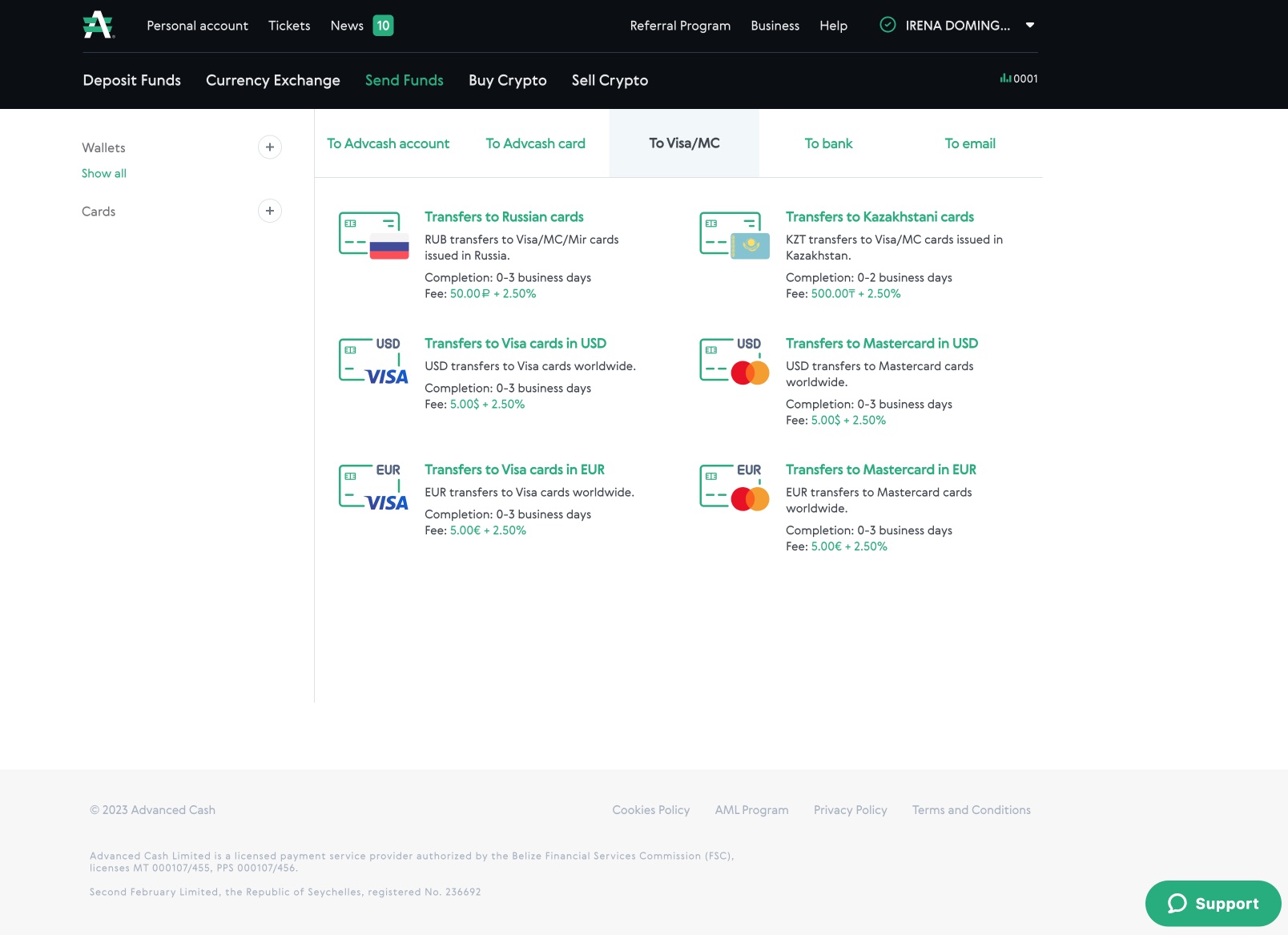
The advantage of Advcash over other methods like Profee is that it allows you to send money to any Visa or MasterCard issued in Russia. It also allows you to send money to any MIR card. And, of course, you can also send money to any European card. The downside is that the process is done in two steps (first you have to top up the account and then send the money) and that fees are applied at each step.
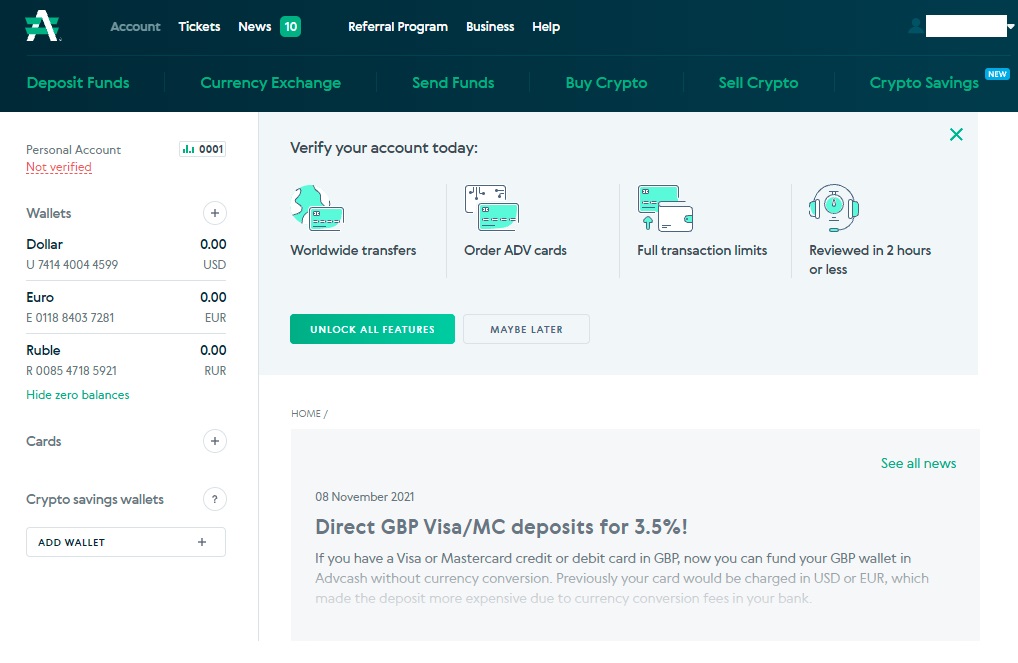
Advcash accepts the following currencies: Euro (EUR), Dollar (USD), Pound (GBP), Russian Ruble (RUB), Ukrainian Hryvnia (UAH), Kazakh Tenge (KZT), Brazilian Real (BRL), Turkish Lira (TRY) , Vietnamese Dong (VND) and the Azerbaijani Manat (AZN).
As I said, the process of sending money is done in two steps:
First step. You have to top up your Advcash account. You can do it in three ways;
- By SEPA transfer: it costs 3.50 euros and takes 1 to 3 business days.
- Through your Visa, MasterCard or UnionPay card: the cost is 3.5% and the recharge is instantaneous.
- Through cryptocurrencies: in this case it is free for Bitcoins and other cryptocurrencies.
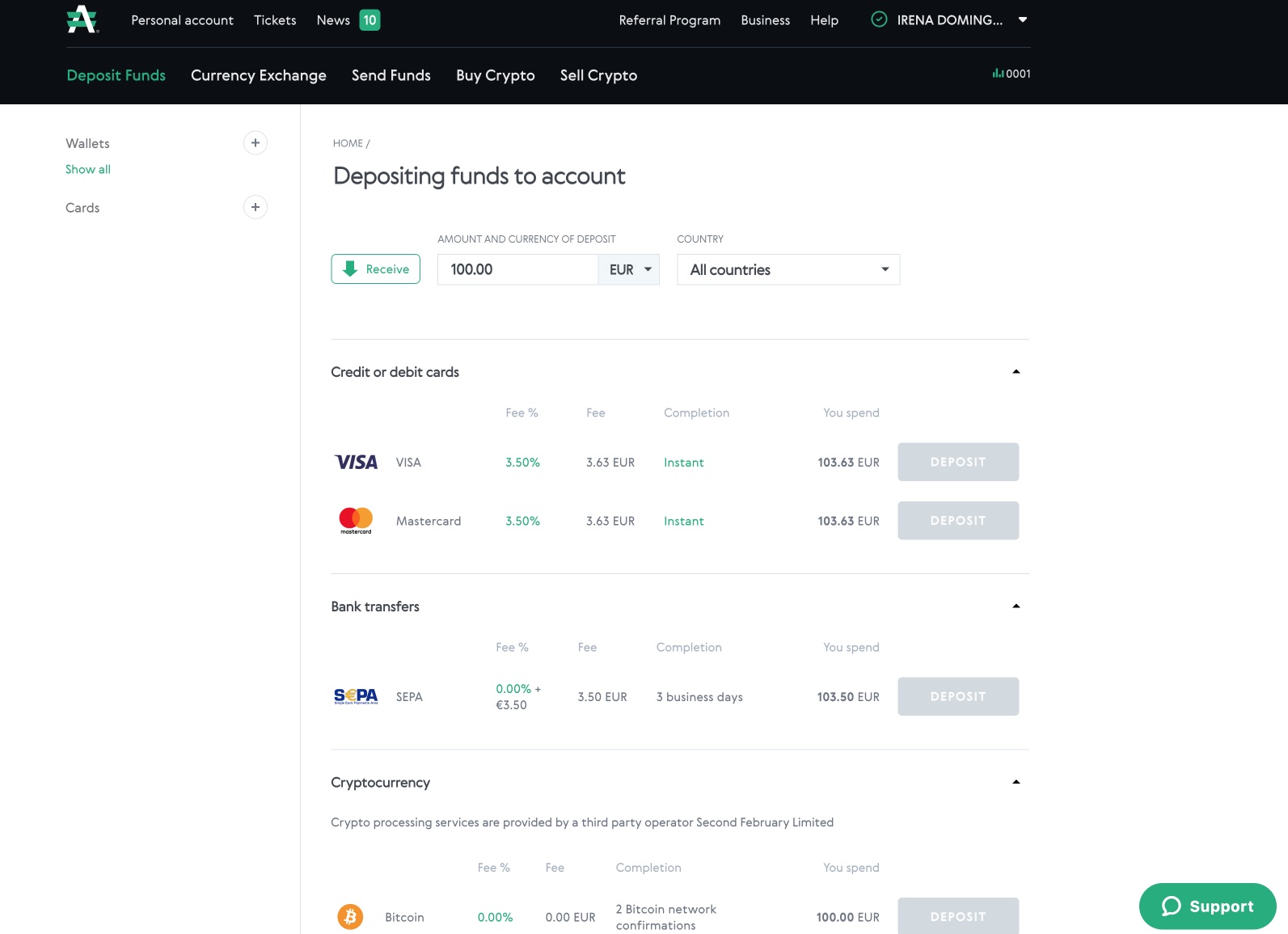
However, depending on the country in which you create the account, the payment systems for topping up the account may be different. Thus, Advcash allows many methods, depending on the country, among which are the following: Wire transfer, Paypal, Revolut, AliPay, Skrill, MoneyGram, WebMoney, AlfaBank, Binance, BitTorrent, Bitcoin, Bitcoin Cash, Bitcoin Gold. BitCoin SV, 0xproject, Algorand, Augur, Avangard, BAT, Capitalist, Cardano, Cash, Chainlink, China UnionPay, Contact, Cosmos, Credit Card, Cryptex, Currency Exchanges, Dai, Dash, Dogecoin, Eos, Epay, Ethereum, Ethereum Classic, Exmo, Forte Bank, Garantex, Gazprombank, Global24, Goldencrown, HUMO, Halyc Bank, Home Credit Bank, ICON, IOTA, Idram, Jisan Bank, Kaspi Bank, Komodo, Kukuruza, Kuna Exchange, Lisk Litecoin, MTS Bank, Maker, Mir, Mobile Balance, Monero, MonoBank, NEM, NEO, Neteller, NixMoney, OmiseGO, Ontology, Openbank, Oschadbank, PUMB, Pax Dollar, Paxum Ewallet, PaySera, Paymer, Payoneer, Polkadot, Polygon, Post Bank, PrivatBank, Promsvyazbank, QIWI Wallet, Qtum, RNCB, RSBank, RaiffeisenBank, Ravencoin, Ria Money Transfer, Ripple, Rosbank, Russian Agricultural Bank, Sberbank, Solana, Stellar, TCS Bank, TRON, Tether, Tezos, TrueUSD, UNI, USD Coin, UZCARD, UkrSibbank, Uniswap, VTB, VeChain, ValesPay, Verge, WU, Waves, WhiteBIT, Wrapped Bitcoin, YooMoney, Zcash, ecoPayz, etc.
Second step. Once you have money in your account, you can now send money to a Russian card. It is not necessary for the recipient to have an account with AdvCash. You can send money to any Russian card. The fee is 50 rubles plus 2.5% of the total amount sent. For sending 600 euros to a Russian card, I was charged 15.50 euros.
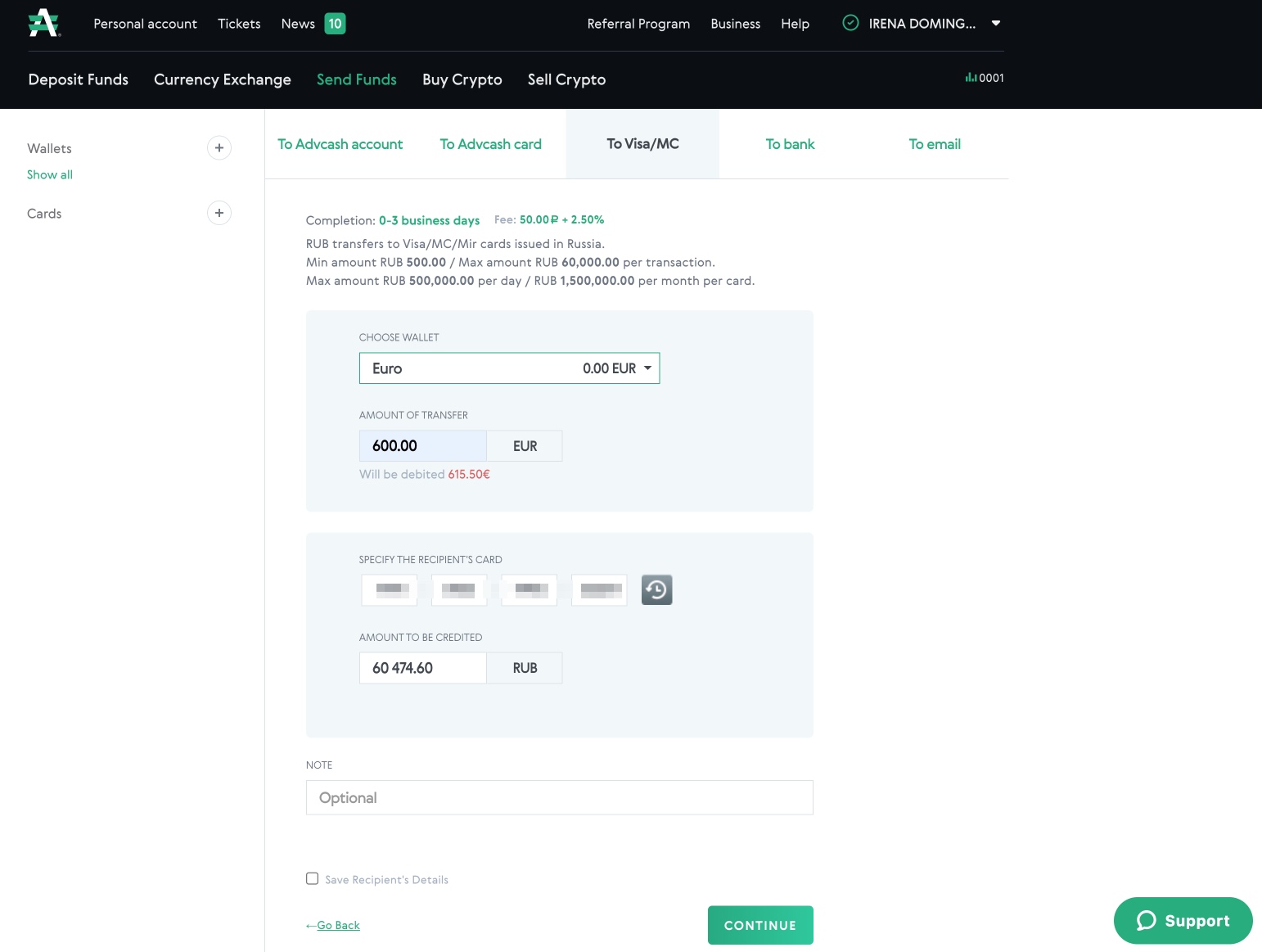
In summary, for sending 600 euros I paid 19 euros commission, the 3.50 euros commission for topping up the account by transfer and the 15.50 euros commission for sending the money to the Russian card. The euro-ruble exchange rate applied is quite good. If I had used the card to recharge funds, the cost would have been higher: 21 euros for the card recharge and 15.50 euros for sending to a Russian card.
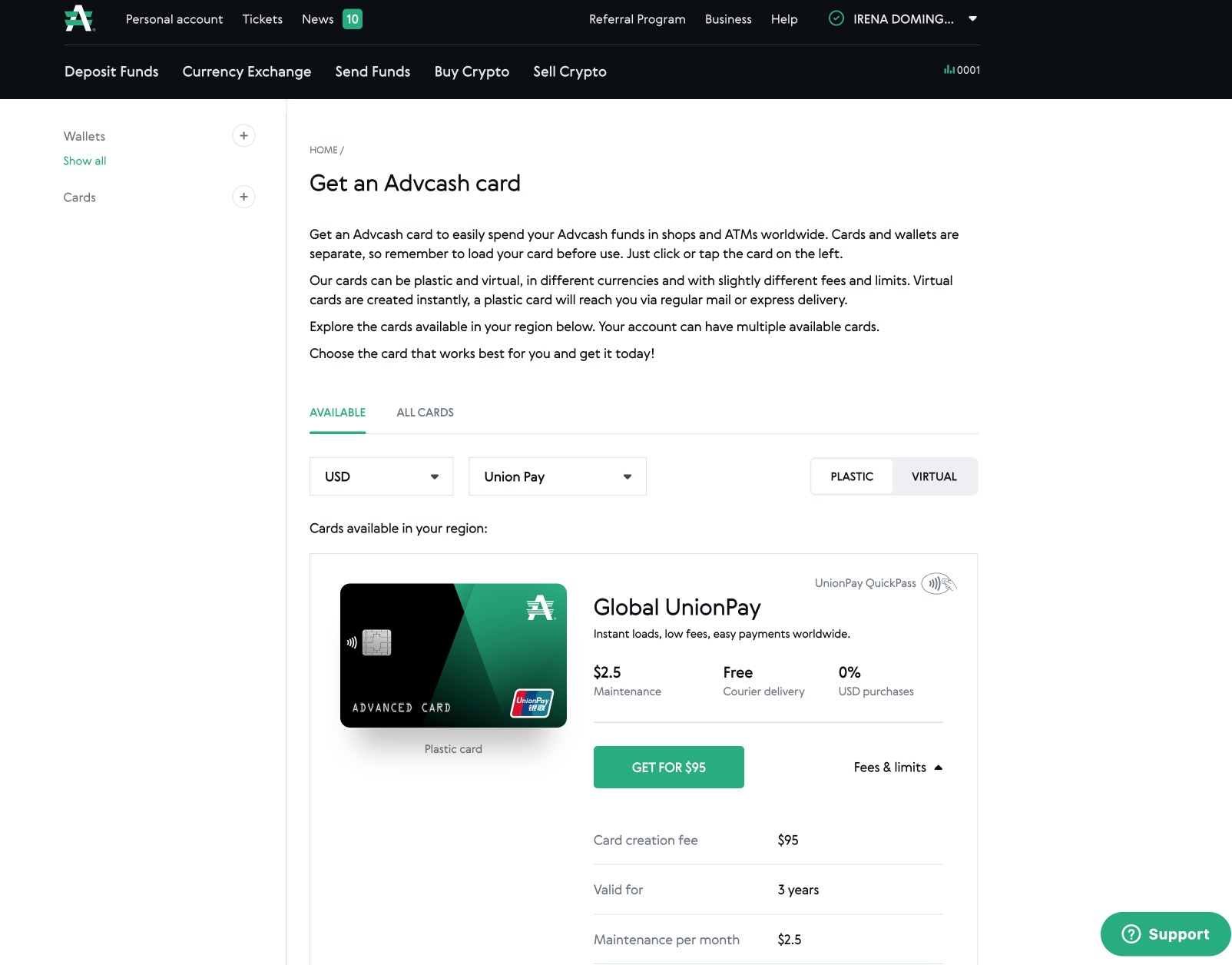
In addition to sending money, Advcash also allows you to purchase a UnionPay card, both physical and virtual. This card allows you to withdraw money at Gazprombank ATMs in Russia and make purchases at those merchants that support it. The physical UnionPay card comes in US dollars, it costs $95 and applies a commission fee of $2.5 per month.
Option 2: Profee
Profee is another method I have found to send money to Russia nowadays. It’s a payment system that I discovered a few months ago by chance through a thread on Reddit and that allows sending money to Russia from your card in euros, dollars or punds to a Russian card in rubles. The company is domiciled in Cyprus.
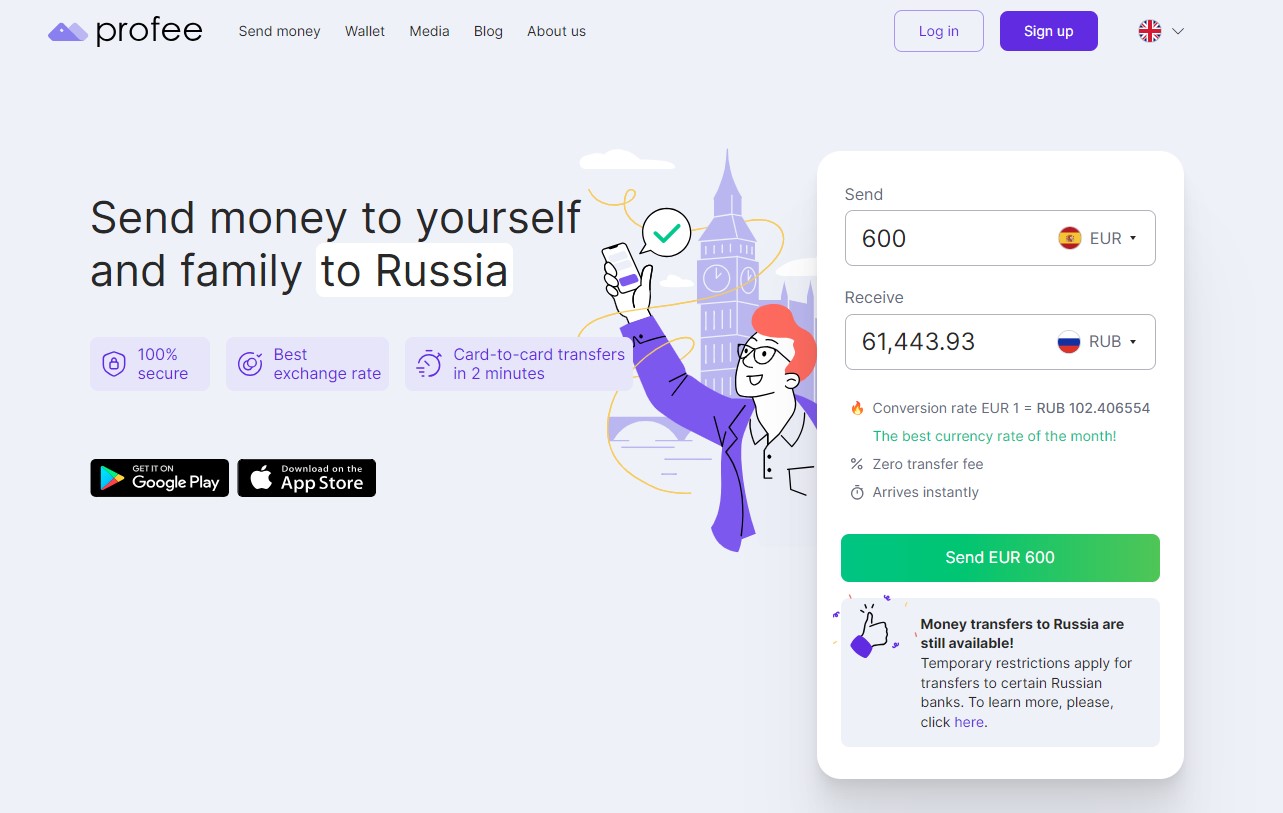
The good thing is that Profee applies a good exchange rate euro/dollar/pound/ruble, does not apply commissions (at least for the first transfer using this link) and money arrives instantly. The bad thing is that the list of banks to which you can send money is limited. To test it the first time I made a transfer of 100 euros to a Pochta Bank card and the money arrived immediately.
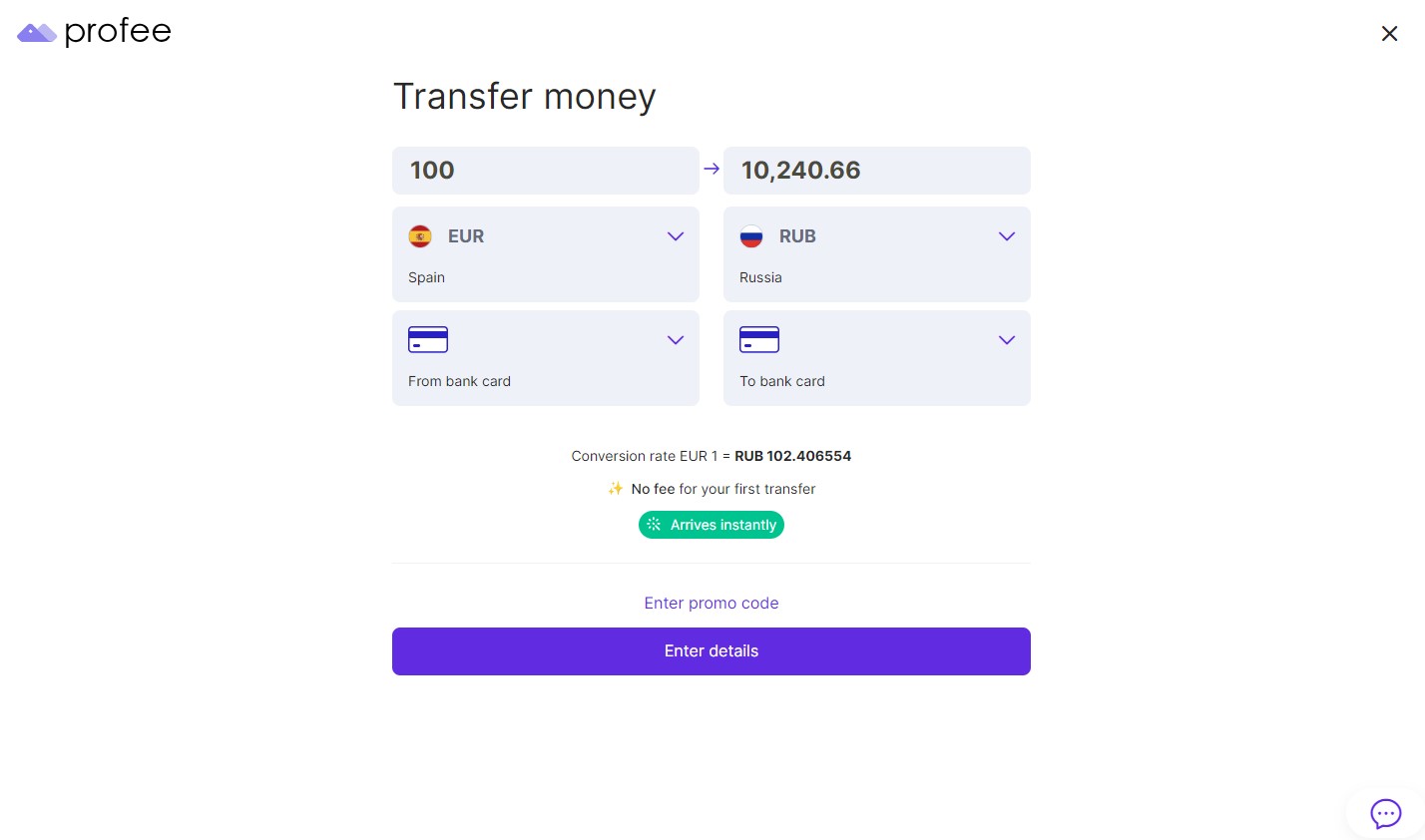
You must create an account following the registration process in which you will have to verify your phone number, your email and send a photo of your ID or passport. You must also take a selfie. If you follow all the steps the verification is done instantly.
The recipient of the money does not need to have a Profee account in order to receive the money. The money will be sent to their Russian card. Please note, however, that currently it is only possible to transfer money to Visa, Mastercard and MIR (Russian payment system) cards issued by some Russian banks, such as:
- Raiffeisen Bank
- Pochta Bank
- UniCredit Bank
- Home Credit Bank
- Citibank
- Renaissance Credit
- Credit Europe Bank
- Ozon Bank
- And other banks
On the other hand, it is not possible to send money to cards issued by the following Russian banks
- SberBank
- Tinkoff
- VTB,
- Alfa-Bank
- Gazprombank
- Russian Agricultural Bank
- Otkritie
- Uralsib
- Credit Bank of Moscow
- Bank Saint Petersburg
- Sovcombank
- MTS Bank
- Rosbank
- SMP Bank
- Russian Regional Development Bank
- The Ural Bank for Reconstruction and Development
- Rossiya Bank
- Novikombank
- Moscow Industrial Bank
- ZENIT Bank
- And other banks
Please note that the above list is not exhaustive and may change from time to time.
Therefore, the recipient of the transfer must have a card from one of the above-mentioned Russian banks.
Option 3: KoronaPay
A similar method to Profee is Koronopay. To send money with Koronapay you need to install their mobile app and verify your account. In addition to sending to Russian bank accounts or cards, it also allows you to send cash and pick it up in Russia at an office.
As with Profee, you may not see Russia as a destination country on their website, however, once you sign up, Russia does appear as a destination country.
Note: If you need a promotional code from Koronopay you can use this code: YJ765 (you will get 15 euros in your account on the first transfer you send to Russia for an amount over 100 euros).
Option 4: BestChange
BestChange is a web that facilitates the exchange of currencies as well as cryptocurrencies. The portal is in English and Russian. You can use the platform to perform currency exchanges either between different payment processors as well as between different types of currencies.
For example, if you have money in euros or dollars on a Visa card or PayPal account and want to transfer it to a ruble account or card, BestChange will show you a list of exchangers with the best rates. Clicking on the name of a specific exchanger will open the corresponding website to perform the transaction.
All exchangers go through a verification process by the portal administration, which prevents scams.
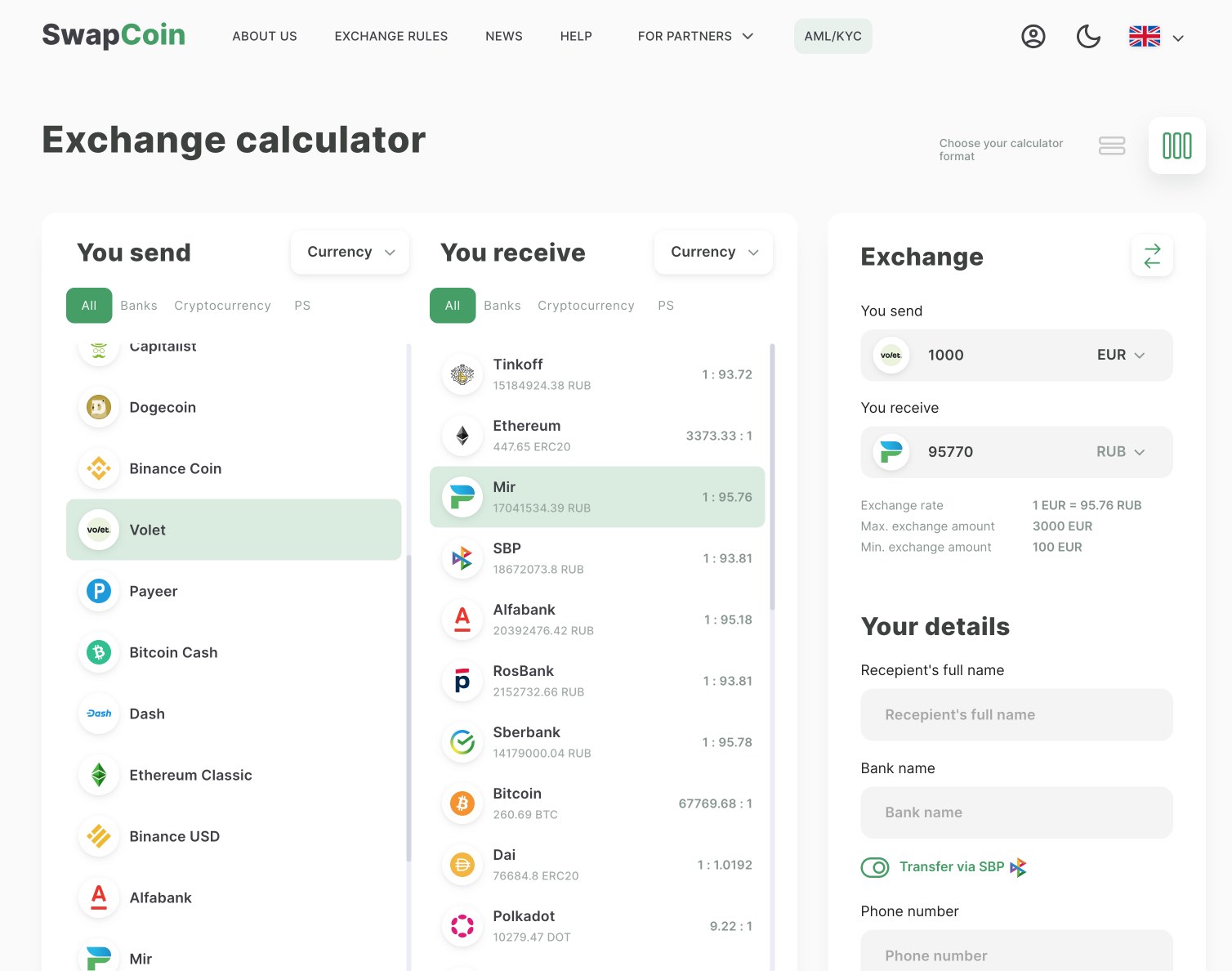
For example, I have recently used the services of the Swapcoin exchanger to send rubles to a MIR card. To do this, I previously recharged my Volet account (formerly Advcash) and through SwapCoin I was able to send money from Volet to a Russian MIR card.
Option 5: Cryptocurrencies
After the closure of Binance’s business in Russia and its sale to Commex (operator that also announced its closure), the operators that allow sending money to Russia through cryptocurrencies are becoming less and less: Bybit, HTX, etc.
Besides, it should be noted that it is possible to install a wallet in Telegram app to send cryptocurrencies.
In both cases, the most common procedure consists of two steps:
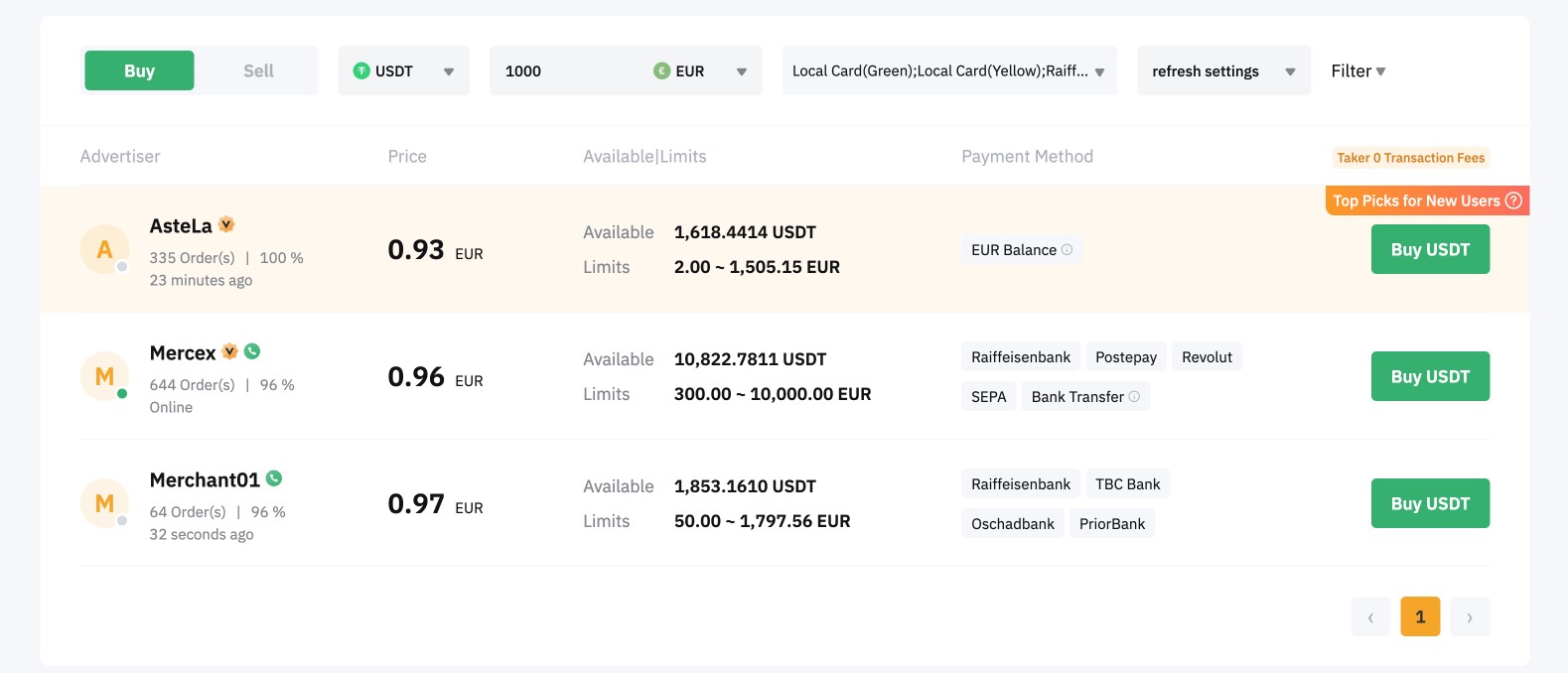
- First, buy USDT with a bank card (USDT is a stablecoin whose value is tied to the dollar and does not fluctuate as much as Bitcoin and other currencies).
- Secondly, sell USDT for rubles directly through these platforms or via a P2P marketplace and receive the rubles by wire transfer or via a Russian bank card (Tinkoff, Rosbank, etc.).
I hope you found this article useful for sending money to Russia in the current situation.
