
Happ VPN in Russia: What It Is, How It Works and How to Use It Without Getting Scammed
 By Irena Domingo
Updated on
In This Article
Happ isn’t a VPN: it’s a free app where you paste a “key” that someone else, a person or a company, gives you. It’s hugely popular in Russia because those keys use protocols like VLESS, which disguise themselves as normal web traffic and usually get past the blocks. But the app on its own doesn’t connect you to anything: what matters is where the key comes from, and that’s where you need to be careful.
This is step 8 of my guide to planning a trip to Russia in 10 steps, where you’ll find everything else in order.
I’m writing about it because in the survey I ran with readers in October 2026, several mentioned Happ and “Telegram bots that sell keys”, and hardly anyone really knew what they were using. Here I explain how it works, how to install the real Happ and where to get a key without being ripped off.
In short
- What it is: a free app for iPhone, Android, Windows and Mac. It doesn’t sell VPN service.
- What else you need: a key or subscription (a link starting with vless://, for example).
- Safest: a key from your own server or from someone you trust.
- Riskiest: buying one from an unknown Telegram bot.
How it works: three separate pieces
With a regular VPN, like Amnezia Premium, the app, the servers and the subscription all come from the same company. With Happ they’re three different things, and that’s what confuses everyone:
- The app (Happ). It’s like a TV set: without channels, you see nothing.
- The key or subscription. That’s the “channel”. It can be a single link (vless://…, ss://…) or a subscription address that downloads a list of servers and updates itself.
- The server. The computer outside Russia that your connection goes out through. Whoever gives you the key provides it, or you do, if you have your own VPN with Amnezia.
So when someone tells you “I use Happ and it works great”, what they’re really telling you is that their key works. Someone else with Happ and a different key might have no internet at all.
What readers have told me
In the October 2026 survey, with answers in five languages, Happ came up about eight times. Almost always with the same pattern: the traveler hadn’t set it up alone. An Italian reader put it like this: “a Russian girl installed it for me”. Others had their own server, or a friend there had passed them the key.
Only one reader, who lives in Russia, explained the whole system to me: he signs up with a Telegram bot, pays between 100 and 300 rubles a month, copies the link they give him and pastes it into Happ. He says it has worked perfectly for over a year.
Step 1: install the real Happ
This matters more than it seems. Happ is so popular that there are fake apps and bots using its name: search for “Happ” on Telegram and you’ll find several bots called “HAPP VPN” selling subscriptions, none of them official. The developers say it again and again on their channel: Happ doesn’t sell VPN service, and anyone selling you “Happ VPN” isn’t Happ.
- iPhone, iPad and Mac: Happ – Proxy Utility on the App Store. The developer is Flyfrog LLC. Install it from your home country’s App Store: it has been pulled from the Russian one several times, so do it before you travel.
- Android: Happ – Proxy Utility on Google Play. The developer is listed as HappDev (Flyfrog) and it has over 10 million downloads, so be wary of copies with only a few.
- Windows and Linux: download it from its official website, happ.info, or from its GitHub page, where every new version is published.
- Its official Telegram channel is @happ_proxy. Don’t trust any other.
The app is free. You don’t need to create an account or pay for anything inside it.
Step 2: add your key
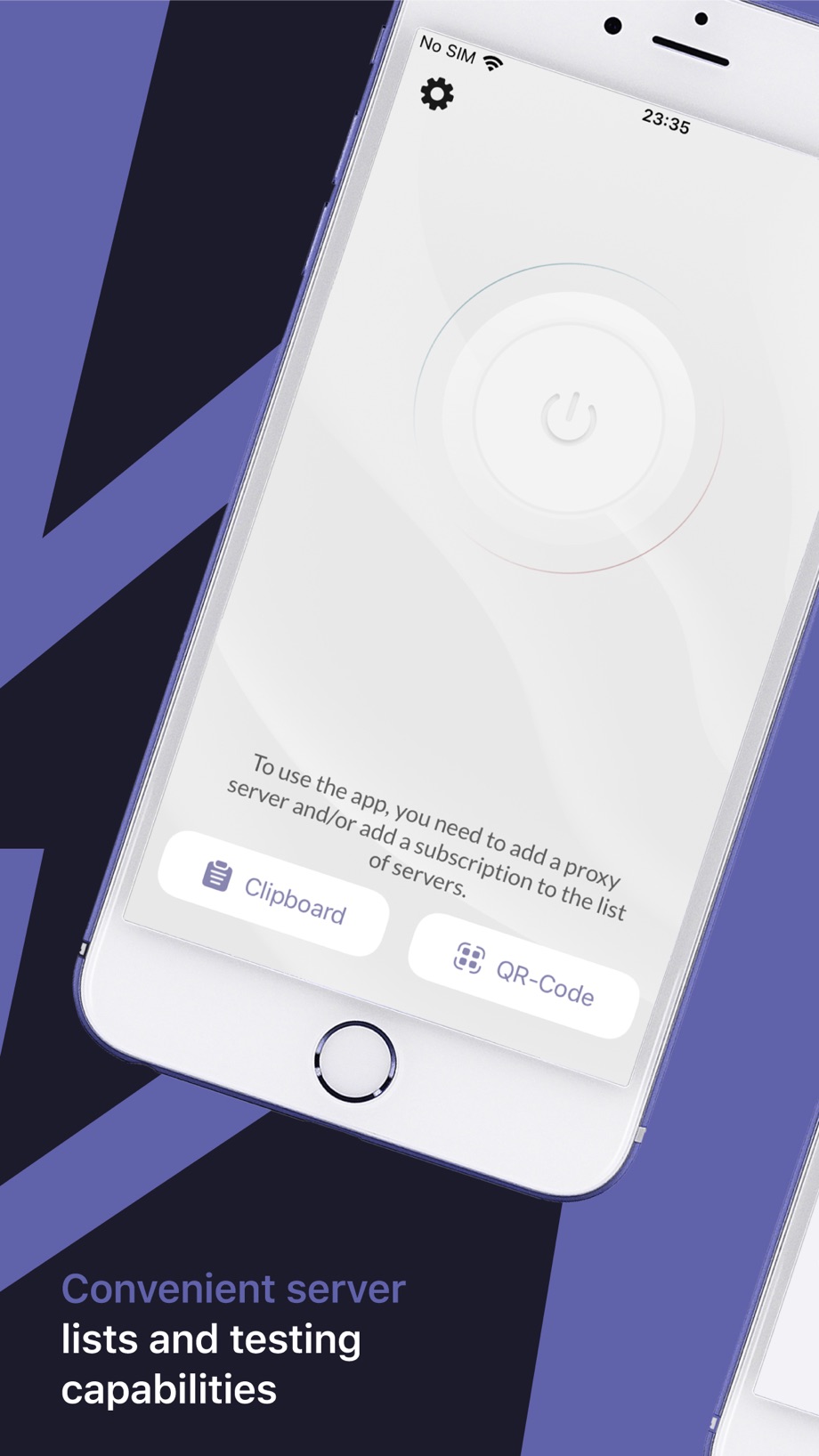
When you open Happ for the first time you’ll see a power button and a message: to use the app you need to add a server or a subscription. There are two ways:
- “Clipboard”: copy the whole key (the text starting with vless://, ss://, happ://… or the subscription address) and tap this button. Happ pastes it in for you.
- “QR-Code”: if you’re given a QR code, tap this button and scan it with the camera.
If you already have a key, the button to add another is the “+” at the top right.
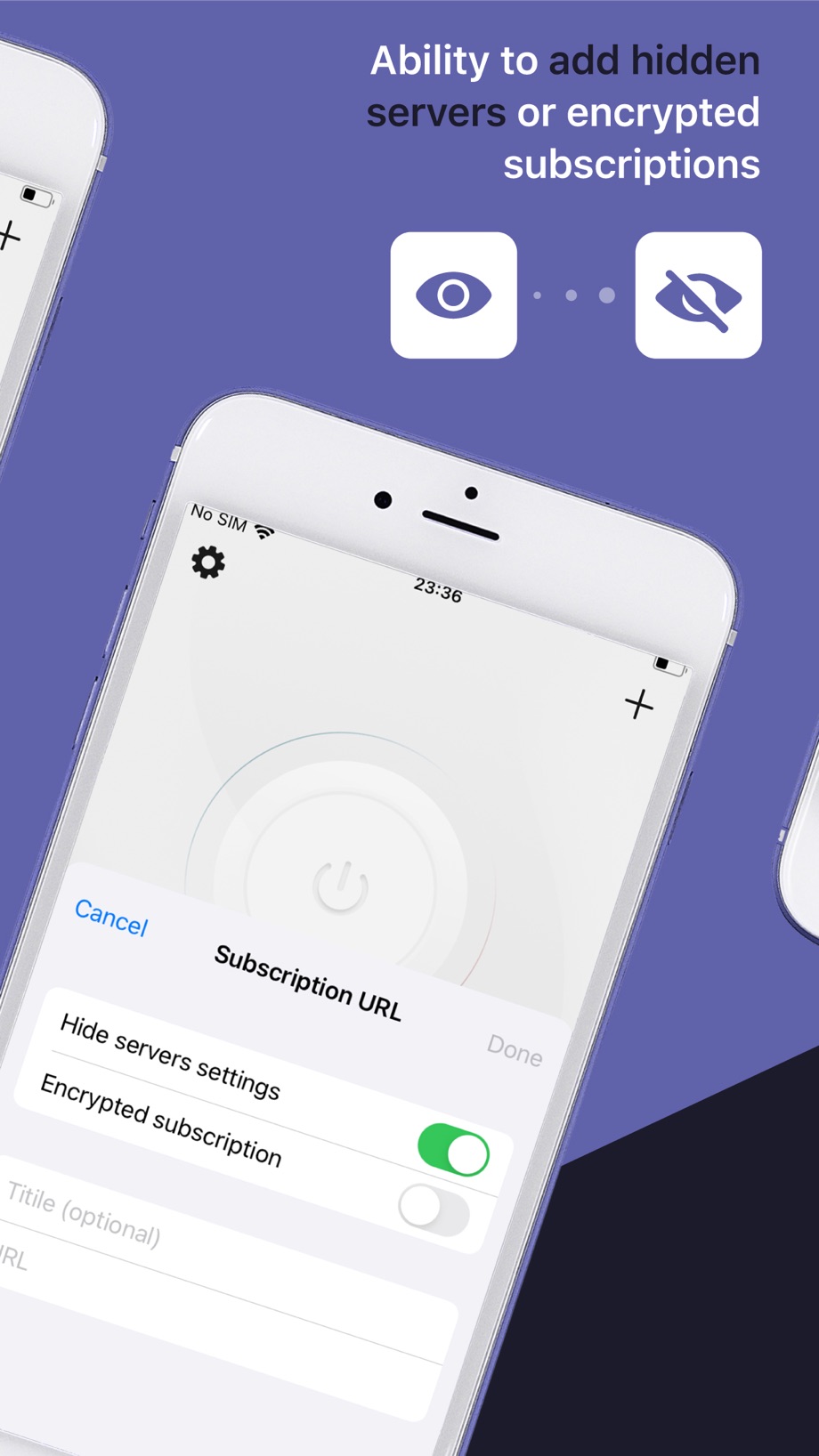
If you’re given a subscription address and would rather enter it by hand, you can do that from the “+” too: a screen appears where you paste the address into the “URL” field and give it a name if you like.
Step 3: choose a server and connect
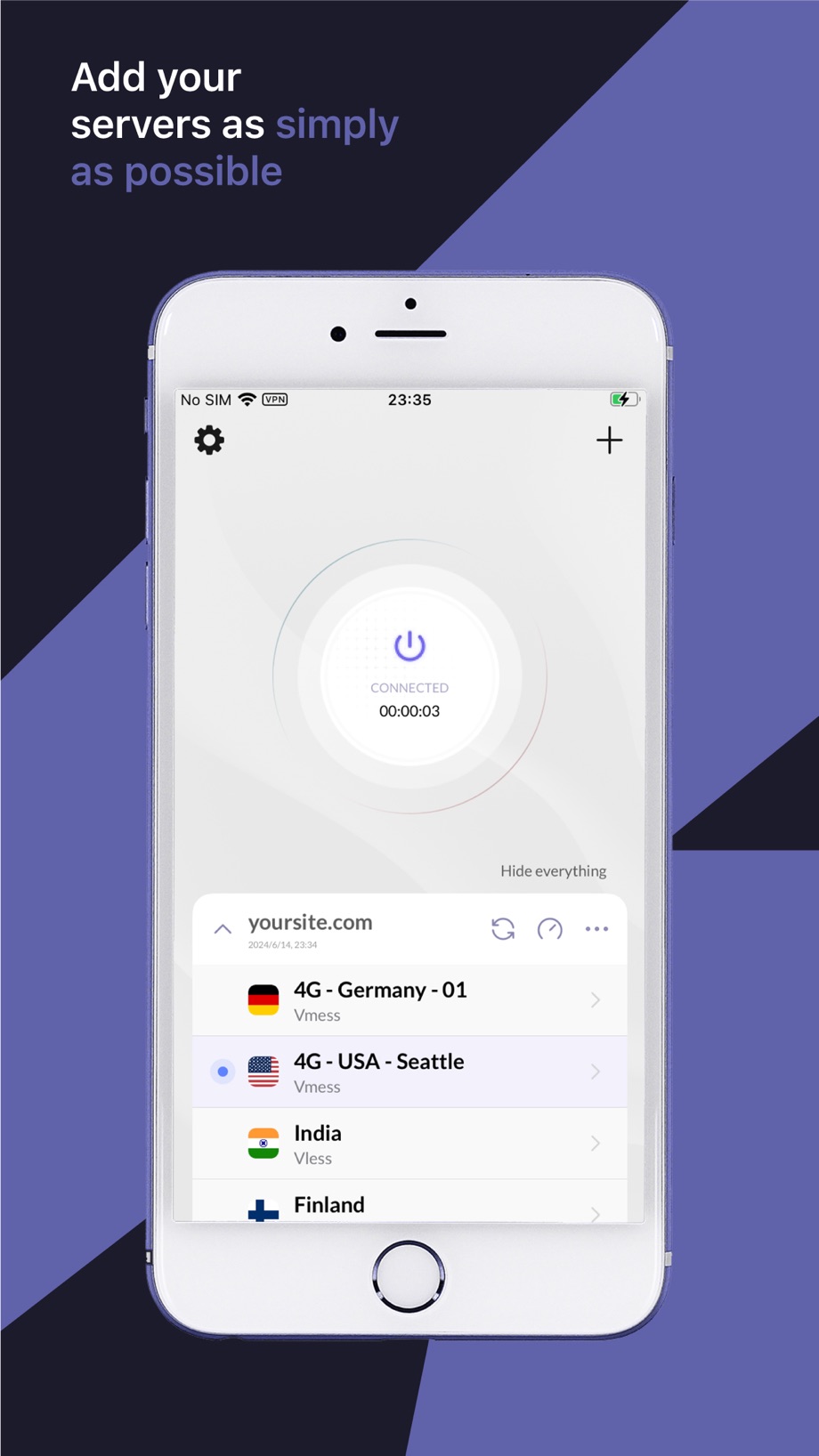
When you add a subscription, the list of servers it includes appears under the button, each with its country and protocol (VLESS, VMess…). Tap the one you want and then the big power button. The circular-arrows icon refreshes the list, and the speedometer icon checks which servers respond and which is fastest: use it before you choose.
A tip that comes up a lot in Russian chats: in Happ’s settings, under “Routing profiles”, you can make Russian websites and apps (banks, Yandex, Gosuslugi…) bypass the VPN. They work better that way and the server is less likely to end up blocked. On Android you can also choose which apps go through the VPN under “Per-app Proxy Settings”.
Where to get a key, from safest to least safe
1. From your own server
This is the most reliable option: the key is yours, nobody else uses that server and you don’t depend on a stranger. If you follow my tutorial to set up your own VPN with Amnezia and install the XRay protocol, when you share the connection you can pick a format for other apps instead of Amnezia’s, and paste that key into Happ. Plenty of people in the Amnezia chat do exactly that. Although, honestly, if you already have your own server, the simplest thing is to use the Amnezia app itself.
2. From someone you trust in Russia
This is what many readers do: a friend, family member or partner who lives there and already has a subscription that works passes them a key. The upside: you know that key works right now with Russian carriers. The downside: you depend on that person still paying and on the service staying alive.
3. From a Telegram bot (carefully)
There are countless services selling keys through Telegram bots, usually for a few hundred rubles a month. Some work very well. But I’m not going to recommend any, for a simple reason: there’s no way to know who’s behind them, they come and go within weeks, and Russian VPN channels regularly warn about copies and scams. On top of that, many only accept Russian payment methods.
If you still want to try one, these are the signs I’d look for:
- A recommendation from someone using it right now, not a message in a group with a link and a fire emoji.
- Its own channel with a track record: months of posts, notices when there are outages and replies to users.
- A free trial or monthly billing. Never pay a year upfront to a service you don’t know.
- No “Happ” in its branding. Happ has no VPN service of its own and no official partners selling under its name.
- No requests for data it doesn’t need: not your passport number, not passwords, not access to your Telegram account.
⚠️ Keep in mind
Whoever gives you the key controls the server all your traffic goes through. Don’t use a stranger’s key for your home bank, your work email or anything sensitive: for that, use a VPN from a known company or your own server.
Other apps similar to Happ
Happ isn’t the only one. Apps such as v2RayTun, Streisand (iPhone), v2rayNG (Android), Hiddify or Karing do the same thing, with a key you give them. A VLESS key usually works in any of them, so if someone gives you one and you don’t like Happ, you can try another. In the survey, two readers used Karing, and in both cases a Russian friend had installed it for them.
Is Happ worth it for you?
- Yes, if someone you trust gives you a key or if you have your own server with XRay. It’s a solid app, updated often, with good options to keep Russian apps off the VPN.
- No, if you’re going to Russia for a couple of weeks and don’t know anyone there. You’d have to hunt for a key blindly on Telegram just when you need it most. For a short trip it’s simpler to bring Amnezia Premium already set up from home: I explain how in Amnezia VPN for Russia.
And remember that on “whitelist” days, when mobile carriers only let Russian services through, no key works on mobile data, whether in Happ or any other app. I explain this in my guide to VPNs in Russia.
Frequently asked questions
Is Happ a VPN?
No. Happ is a free app for connecting to proxy and VPN servers. It doesn’t sell any service: you need a key or subscription from another person or company, or your own server.
Is Happ free?
Yes, the app is free on the App Store, Google Play and for computers. What you pay for, if anything, is the key or subscription from the server provider.
How do I know I have the real Happ?
On the App Store it’s called Happ – Proxy Utility and the developer is Flyfrog LLC. Its official website is happ.info and its Telegram channel is @happ_proxy. Any bot or service called Happ VPN is not official.
Where can I get a key for Happ?
The safest options are your own server or a key from someone you trust who uses it in Russia. Telegram bots that sell keys can work, but there’s no way to know who’s behind them and there are many scams.
Does Happ work in Russia?
It works if the key you use works. Keys using protocols like VLESS usually get past the blocks, but on mobile carriers’ whitelist days none of them work.
Can I use an Amnezia key in Happ?
Yes, if it’s an XRay key from your own server and you choose a format for other apps when sharing it. AmneziaWG keys and Amnezia Premium keys are used with the Amnezia app.
Have you used Happ or a similar app in Russia recently? Tell me in this form what worked for you and on which carrier. I use the answers to keep this guide up to date. It takes two minutes.
In This Article
Was this useful? I'll tell you when something changes in Russia
One short email a month with what has changed for travellers (visas, payments, border crossings, apps), based on what readers report to me from Russia. More than 4,000 of us already. No spam: if you ever lose interest, unsubscribing is one click.
Irena DomingoAbout Me
I was born in Russia. I grew up between two worlds: my father was Russian, my mother Spanish — a descendant of the "Children of Russia", the Basque children evacuated to the USSR during the Spanish Civil War. I've worked as a translator, interpreter and Russian teacher for over 30 years, and since 2013 I've been writing this blog to help travelers discover Russia with practical, always up-to-date information. Author of the Russiable Guide. If this blog has helped you plan your trip, you can buy me a coffee ❤️.
 Internet in Russia in 2026: What Works, What Doesn’t and How to Prepare
 What Apps to Use in Russia (When Google, Uber or Booking Don’t Work)
 GPS and maps in Russia: why GPS fails and which apps to use (even offline)