
How to Send Money to Russia Using Volet and SwapCoin
 By Irena DomingoUpdated on 3 min read
In this article
Sending money to Russia can feel tricky, especially if you don’t want to deal with cryptocurrencies or complicated technical steps. Plus, many methods no longer work. That’s why I’m sharing a method I’ve personally used recently that worked smoothly: using Volet to easily load euros and SwapCoin to send them directly to a Russian MIR card. It’s a much simpler option than relying on crypto, and in this guide I’ll walk you through exactly how to do it, how much it costs, and what to keep in mind to make sure everything goes smoothly.

1. What is Volet?
Volet is an electronic payment system (e-wallet) offering accounts in multiple currencies (EUR, USD, RUB, GBP, among others). Formerly known as AdvCash, it allows you to operate securely and quickly in places where other platforms like Wise, Revolut, or PayPal aren’t available (for example, Russia).
Main features:
- Free account opening for personal users.
- Supports internal transfers, card top-ups, and SEPA transfers.
- Compatible with currency exchange platforms (exchangers) like SwapCoin.
- Interfaces available in English, Russian, and other major languages.
Important: Volet does NOT accept users who reside in the U.S., U.K., or Canada.
2. How to open and verify a Volet account?
Step 1:
Go to Volet and click Sign up.
Step 2:
Fill in the required details:
- Full legal name.
- Email address.
- Secure password.
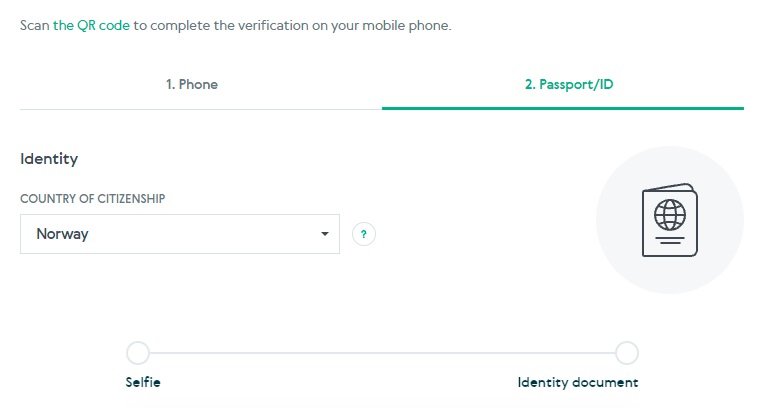
Step 3: Identity verification (KYC):
- Upload a photo of your passport or national ID card.
- Take a real-time selfie to confirm your identity (Volet uses facial recognition).
- Upload a proof of address (utility bill, bank statement) if you want higher transaction limits.
Estimated time: 10 to 30 minutes.
Tip: Use an updated browser and complete verification in a well-lit space since you’ll need to take a selfie.
3. How to fund your Volet wallet?
Once your account is verified:
1. Log into your dahboard and choose “Add Funds” → “Deposit EUR”.
2. Available top-up options:
| Method | Fee | Time | Daily Limit |
|---|---|---|---|
| Visa/Mastercard | 3.5% | Instant | Up to €5,000/day |
| Local bank transfer to USD wallet | 0 | 24 hours | Up to €15,000/day |
| Cryptocurrency (USDT, BTC, etc.) | 0% + network fee | ~10–60 min | Unlimited |
Note: If you use a card, the charge will appear as an international transaction. Make sure your bank allows foreign payments.
Practical example:
- If you top up €300 by card (with a 3.5% fee), it will cost around €310.88 in your Volet wallet. Currently, SEPA euro transfers aren’t available for funding your account.

4. How to send €300 to Russia using SwapCoin?
SwapCoin is a currency and crypto exchange platform that lets you swap Volet EUR balance for rubles, sending them directly to:
- A Russian MIR bank card (e.g., Sberbank, Tinkoff, VTB).
- Or a Russian bank account.
Why use SwapCoin?
- Fast exchanges (usually under 30 minutes).
- Reasonable fee (~1% of total).
- Direct transfers to MIR cards, widely used in Russia, and many Russian bank accounts.
Important: SwapCoin requires a minimum of €300 for transfers to MIR cards.
4.1. Step-by-step process
1. Go to SwapCoin.
2. Choose the exchange pair:
- “You Send”: Volet EUR
- “You Receive”: MIR RUB
3. Enter the following:
- Amount: €300 (exact).
- Recipient’s MIR card number (16 digits).
- Cardholder’s name.
- Contact phone number.
- You might be asked for a Telegram account (a Russian app used instead of WhatsApp).

4. SwapCoin will calculate:
- Current exchange rate (e.g., €1 = ₽88.444).
- 1% fee.
5. Confirm the transaction → SwapCoin will redirect you to your Volet account to send the funds. You’ll need to log in with your username and password to authorize it.
6. Once authorized, SwapCoin processes the payment and transfers the rubles to the recipient’s MIR card.
Estimated time: 15 to 30 minutes after confirmation.

5. Example calculation: sending €300
| Item | Detail | Result |
|---|---|---|
| Initial top-up | €300 (3.5% fee applied, that’s €10.85) | €310.85 |
| Available balance in Volet | After top-up | €300 |
| SwapCoin fee | 1% on €300 | €3 |
| Net amount exchanged | €300 – €3 | €297 |
| Exchange rate applied | €1 = ₽88.444 | ₽88.444 |
| Net rubles received by recipient | €297 × ₽88.444 | ≈ ₽26,273 |
So in summary:
- You top up €310.85.
- You send €300.
- The recipient gets approximately ₽26,273 on their MIR card.
Effective cost:
The total operation costs about €10.85 for the top-up + €3 SwapCoin fee = €13.85, equivalent to around ~4.5% of the amount sent.
Was this useful? I'll tell you when something changes in Russia
One short email a month with what has changed for travellers (visas, payments, border crossings, apps), based on what readers report to me from Russia. More than 4,000 of us already. No spam: if you ever lose interest, unsubscribing is one click.
Irena DomingoAbout Me
I was born in Russia. I grew up between two worlds: my father was Russian, my mother Spanish — a descendant of the "Children of Russia", the Basque children evacuated to the USSR during the Spanish Civil War. I've worked as a translator, interpreter and Russian teacher for over 30 years, and since 2013 I've been writing this blog to help travellers discover Russia with practical, always up-to-date information. Author of the Russiable Guide. If this blog has helped you plan your trip, you can buy me a coffee ❤️.
More to Explore
 Send moneyHow to send money to Russia in 2026 (my personal experience)Based on real experience, compare the transfer options that still work in 2026 such as SendNOW, crypto (Bybit+Whitebird), Volet, BestChange, plus quick tips
 Send moneyHow to Send a Parcel or Letter to Russia in 2026DHL, UPS and FedEx no longer ship to Russia. Here's how to send a parcel from the UK or the US (USPS is back) and what sanctions ban.7 min read
 Send moneyHow SendNOW Works: Step-by-Step Guide to Send Money to RussiaStep-by-step guide to SendNOW: registration, paying by card via Guardarian, KYC verification, how rubles reach Russia, fees and what to do if your card is declined.